
FabFilter Pro-C 3 online help
Table of contents
Go to sectionFabFilter Pro-C 3 Help
Introduction
Using FabFilter Pro-C 3
Full screen mode, resizing and scaling
Presets
Purchasing FabFilter Pro-C 3
Support
Surround and Dolby Atmos
FabFilter Pro-C 3 supports all important surround/immersive audio formats, up to 9.1.6 Dolby Atmos (depending on the DAW and plug-in format). When you add Pro-C 3 to a surround channel, the interface automatically adapts itself to the used multi-channel format. The output level meter will show all channels, with appropriate labels to identify them.
In addition, the Stereo Linking section in the Side chain section will have additional surround functionality.
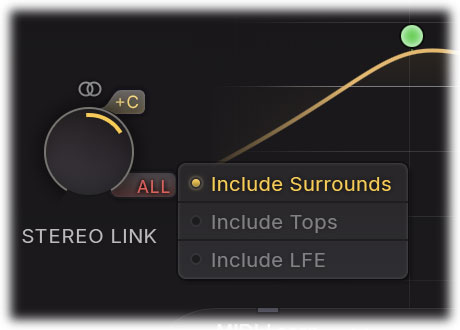
Stereo linking in surround instances
When using Pro-C 3 on a surround track or bus, the first half of the range (from "0% Stereo" to "100% Stereo"), the Stereo Link knob works the same as in the stereo version of the plug-in: it controls the amount of linking between L and R channels (e.g. L/R, Ls/Rs, Lc/Rc or Lts/Rts). However, every stereo pair's linking is still independent of the other stereo pairs.
In the second half of the range (from "100% Stereo, 0% All" to "100% Stereo, 100% All"), all channels will interpolate to full all-channel linking, where every channel triggers on the same signal: the maximum of all channels.
In addition, a C and All button are available:
- With the C button enabled, the center channels (C, Cs) will be included in the linking of their associated L/R stereo pair, i.e. C is linked to L/R and Cs to Ls/Rs. When leaving it disabled (which it is by default), the center channels will always stay unlinked and operate fully independent from all other channels.
- The All button opens a menu where you can toggle groups of speakers (Sides and Tops and LFE), to be included in, or excluded from the all-channel linking in the second half of the range. When leaving an option unchecked, these channels will always stay unlinked and operate fully independent from other channels. The LFE option is disabled by default. If any setting is customized here, the All button will light up red to indicate this.
Notes
- Input/Output panning and Dry/Wet panning are not available when using Pro-C 3 in a surround layout. We recommend to change surround channel levels using a dedicated surround panning plug-in.
Next: Instance list
See Also
Overview