
FabFilter Pro-C 3 online help
Table of contents
Go to sectionFabFilter Pro-C 3 Help
Introduction
Using FabFilter Pro-C 3
Full screen mode, resizing and scaling
Presets
Purchasing FabFilter Pro-C 3
Support
About FabFilter Pro-C 3
There is one signal-processing tool that is almost impossible to do without in any form of audio recording or post-production: compression. Compression is available in a wide variety of different formats, flavors, designs and degrees of quirkiness.
FabFilter Pro-C 3 is not just a good sounding compressor: it is a superb stereo and surround compressor with all the tricks up its sleeve that you will ever need. With its different compression styles, analog character modes and options like mid/side compression and side-chaining with optional EQ filtering, it can work in any desired way. Whether mastering or mixing, Pro-C 3 will do the job with lots of style.
New in version 3
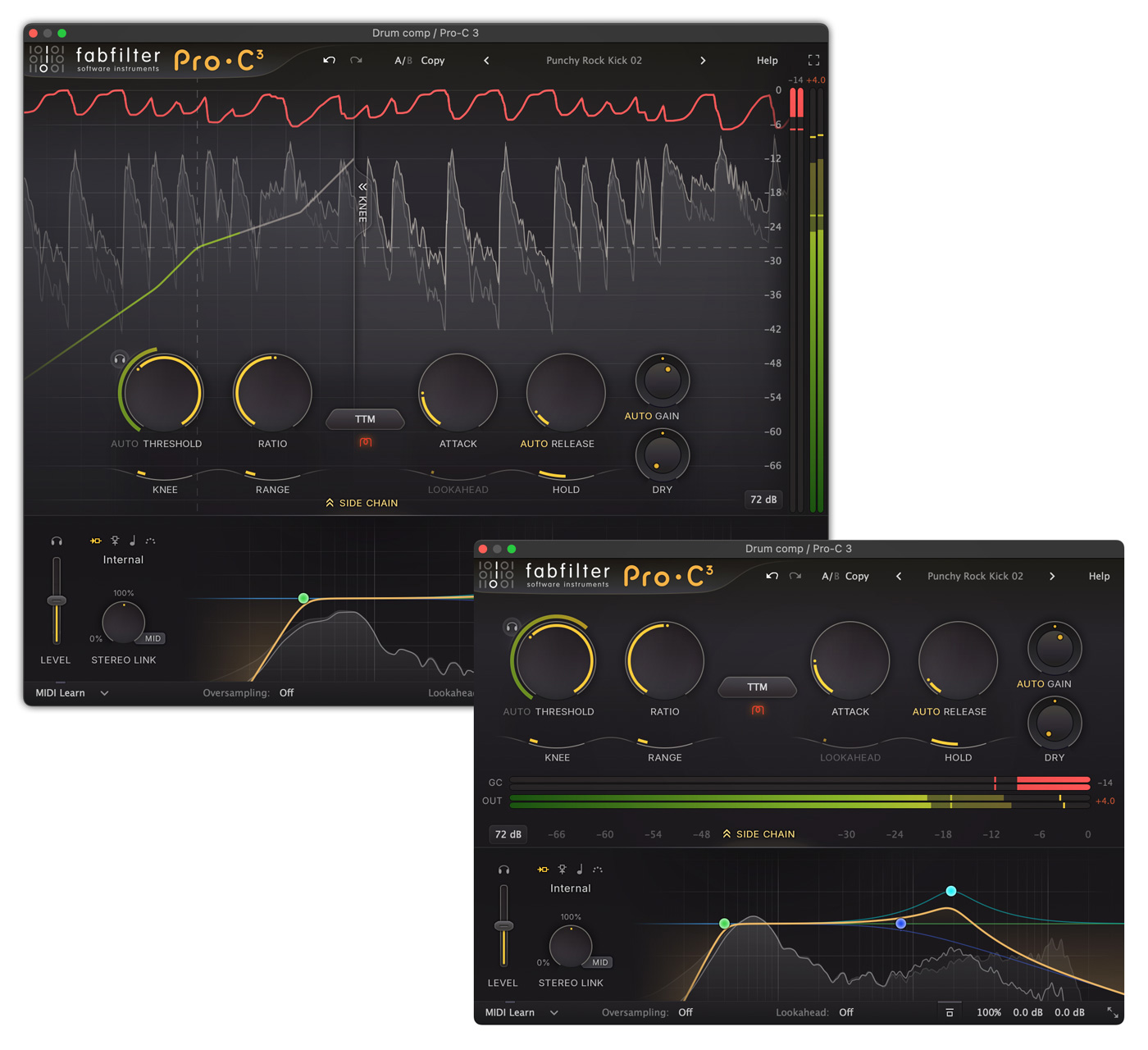
When you open Pro-C 3 for the first time, the layout is familiar, but you will immediately notice that it has a brand new, modern look. With its gorgeous, resizable interface, optional level display, knee display and side-chain controls, it can either take the form of a classic, straightforward analog compressor, or present itself as a modern all-round compressor with extensive metering and controls. It's up to you!
Of course, apart from the new look and feel, we've also added great new features. Most importantly, FabFilter Pro-C 3 introduces six brand-new compression styles. It's like getting six new compressors!
- Versatile - As the name implies, works great on any material. It's punchy at longer attack times but tight and smooth at shorter times
- Smooth - Designed to stay smooth at all times, especially suitable for glueing with low ratio and longer times
- Upward - Pumping, upward compression, like Saturn's much praised Dynamics knob, but with more control over its behavior
- TTM - To The Max multiband mayhem, using combined downward and upward compression
- Op-El - Effortless opto-like tube compression, smooth and warm
- Vari-Mu - A classic variable mu topology, offering smooth and colorful feedback compression
But of course, we didn't stop there:
- Introducing Character modes: built-in, carefully designed analog saturation, coloring and drift brings Pro-C 3 to life. With customizable Drive and Pre/Post-compression routing settings
- Highly improved side-chain EQ section. You can now freely add up to six bands, and use all shapes you already know from Pro-Q 4, including all-pass and brickwall filters. You can even set bands to mid- or side-only
- Introducing host tempo triggering, with customizable sync, offset and pulse length settings
- Full immersive / Dolby Atmos® functionality (up to 9.1.6), with customizable channel/stereo linking
- Introducing Auto Threshold: it makes the threshold level work input level-independent
- Pro-C 3 instances can now be controlled via the Instance List in Pro-Q 4 (starting with Pro-Q 4.10), together with Pro-G and Pro-DS instances
- Introducing the option to set a maximum lookahead between 1 and 20 ms to finetune the latency versus the needed lookahead
- Up to 32x oversampling
- Overall new and fresh design
- New-style preset browser, with easy search, tags and meta data
- MIDI triggering is now more easily accessible via the trigger input selector in the side chain section
- Improved reverse-linking of Dry and Wet level knobs (using Alt+drag, or Shift+drag in Pro Tools)
- Many minor improvements
Upgrading to Pro-C 3
Upgrading from Pro-C version 2 to the new Pro-C 3 is safe and easy: installing Pro-C 3 will not replace or delete the previous Pro-C 2 plug-in. Both versions will co-exist and can both be used at the same time. This ensures that you can open old songs that use Pro-C 2 without problems! FabFilter Pro-C 3 opens presets from Pro-C 2 without problems. See Upgrading to Pro-C 3 for more information.
FabFilter Pro-C 3 is available in VST, VST3, CLAP, AU (Audio Units), AAX Native and AudioSuite formats.
|
Windows requirements Windows 11, 10, 8, 7 or Vista 64-bit or 32-bit VST 2/3 or CLAP host, or Pro Tools |
macOS requirements macOS 10.13 or higher (64-bit only) VST 2/3, AU or CLAP host, or Pro Tools Intel or Apple Silicon processor |
Next: Quick start
See Also
Using FabFilter Pro-C 3