
FabFilter Twin 3 online help
Table of contents
Go to sectionFabFilter Twin 3 Help
Introduction
Using FabFilter Twin 3
Drag-and-drop modulation slots
Polyphony, unison and microtuning
Full Screen mode, resizing and scaling
Presets
Purchasing FabFilter Twin 3
Support
Using MPE
FabFilter Twin 3 supports the MPE standard to make polyphonic modulation possible. MPE can be used through a MIDI source with one of the following inputs:
- Pitch bend input will become polyphonic when Twin 3 receives MPE input. It uses a range of 48 semitones for polyphonic pitch bend when using the default slot modulation level value of 0.16. By default the pitch bend source sends out a combined global/per-note signal, but with the MPE Type button in the MIDI source interface you can choose to use only the global value or only the per-note value. This lets you disable polyphonic pitch bend in case it is not desired (in our experience, some MPE keyboards can make it hard to play in tune otherwise).
- Aftertouch input is mapped to MPE pressure values.
- Timbre input provides the MPE timbre values. The timbre can be interpreted both as unipolar (0..1) or bipolar (-1..1): see below for more information.
- Lift is the release velocity value received for note off events. A nice way to use it is by modulating the EG Main's Release parameter with a MIDI source set to Lift and toggle the +/- button to invert the modulation. This shortens the release if you release a key quickly, which lets you alternate between legato and staccato playing.
When modulating a global target, the value from the last note will be used.
Enabling and disabling MPE
Your DAW should configure Twin to receive MPE events automatically (but see below for host-specific notes).
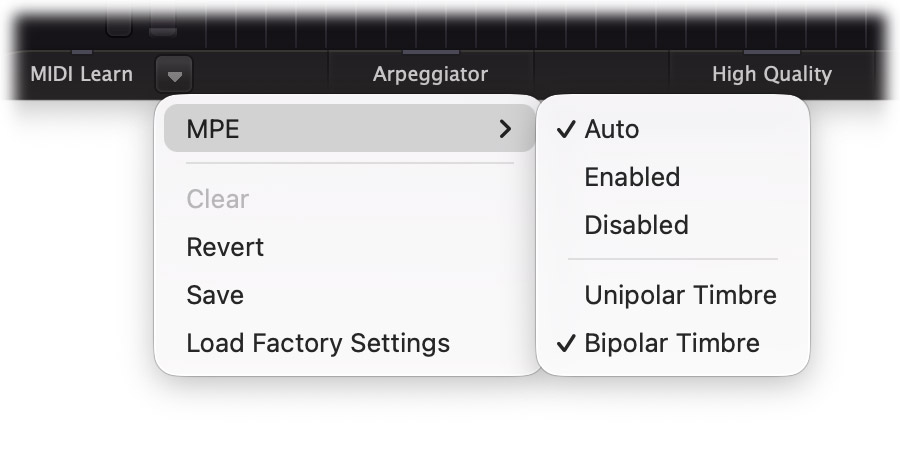
It is possible to manually enable MPE through the MIDI menu in the bottom bar. Click the small menu drop-down button next to the MIDI Learn button in the left-bottom corner of the interface to open the MIDI menu. The MPE submenu offers three options: Auto, Enabled, and Disabled. When set to Auto the plug-in listens to MPE configuration messages from the host and will automatically enable or disable MPE mode based on the information from the host. If the host doesn't provide these configuration messages it is possible to manually enable MPE by setting it to Enabled, which will make the plug-in interpret all incoming MIDI as MPE data. When set to Disabled, the plug-in ignores all MPE data and interprets all MIDI as if it were received on the same channel.
When MPE is enabled, the MIDI button in the bottom bar of the plugin turns light blue upon receiving a MIDI message (instead of the regular yellow).
Unipolar and bipolar timbre
The Timbre input can be interpreted with either a unipolar (0..1) or bipolar (-1..1) range. Click the small menu drop-down button next to the MIDI Learn button in the left-bottom corner of the interface to open the MIDI menu. In the MPE submenu, click either the Unipolar Timbre or Bipolar Timbre option to set the desired mode.
Some MPE keyboards, such as the ROLI Seaboard, always start with a timbre value of 64 and let you make it higher or lower by sliding up or down. This keyboard needs the bipolar mode so the initial timbre value is mapped to zero modulation. If you e.g. modulate a filter frequency with timbre, and slide upwards, the filter will open; if you slide downwards, it will close.
Other keyboards, like the Osmose CE, always start with a timbre value of 0, and make the value higher as you press a key deeper. This requires the unipolar mode to work correctly: otherwise the modulation would snap to full negative at the beginning.
With a device like Ableton Push, you can use either mode. In bipolar mode, touching the center of a pad produces the standard sound for a preset; in unipolar mode, the vertical pad position corresponds exactly to the modulation value that a MIDI source with its input set to Timbre will produce.
The chosen timbre polarity option is saved with your session, and is not changed by loading presets. To set the default for new Twin instances, load the Default Sound preset and change the polarity to your preference. Then open the preset browser, click the Options button  and click Save As Default.
Host and plug-in format support
MPE is supported in all plug-in formats. The VST3 and AAX formats do not support reporting whether MPE is supported, so manually enabling it in your host might be required. Twin also implements Note Expression in VST3. This section includes a guide for enabling MPE in some common hosts.
- In Ableton Live, MPE works out of the box for the AU and VST2 formats, this can be seen from the MPE label in the device title bar. For VST3 it required to enable MPE by right-clicking the device and selecting Enable MPE Mode. Note that you also need to enable MPE for your MIDI controller in the MIDI section of the Preferences dialog.
- In Bitwig Studio, MPE works automatically when using the CLAP format. When using VST2/3, you can enable MPE by selecting the instance of Twin 3 in the Device Panel and clicking the MPE button in the inspector panel. With VST3, Bitwig uses Note Expression.
- Cubase uses Note Expression exclusively. You need to set up your controller first in Studio > Studio Setup. Select the controller on the left: it should be labeled with (NoteExp). Set Pressure to Aftertouch, and the assignment to Expression Name Contains, and type "Pressure". For Horizontal/X, choose Pitchbend, check Use for Tuning, and set the Pitch Range to 48. For Vertical/Y, set the MIDI message to CC 74 (Brightness), Send Initial Value to what your controller needs (see Unipolar and bipolar timbre above), the assignment to Expression Name Contains, and type "Timbre". The Multi-Channel Input Mode should be set to MPE Mode. Click OK and then quit Cubase completely, otherwise the new values will not be applied. Now you can set up an instrument track. In the track settings, under Routing, choose the controller as the input device, choose Any Input, and route it to Twin 3 on Channel 1.
- REAPER, Studio One, Pro Tools and Logic do work with an MPE controller, but need MPE set to Enabled in Twin's MIDI menu (see Enabling and disabling MPE above).
Usage with older presets
As MPE was introduced in Twin version 3.10, presets from before this version will not be designed with MPE in mind. MPE was added to existing MIDI sources, so older presets will now have the added benefit of polyphonic pitch bend and polyphonic aftertouch. To use lift and timbre, you need to add modulation routings via additional MIDI sources.
Next: Full Screen, resizing and scaling
See Also
MIDI source
Overview